 Math Studio
Company while they practise
Booked sessions bring students together in a shared room. Everyone can work on their own mathematics; who is there depends on attendance.
PrepBox Math Studio · from home
Where focus, practice, and perseverance become the norm.
COMPLETELY FREE Your child’s first two sessions. No card needed.
Booking takes a few minutes: a parent email, your child’s name and grade, and a time that suits you.
Your child will need a tablet and pen. An iPad or Android tablet with a stylus, or a computer with a drawing tablet like a Wacom. They write every step by hand, so a mouse or trackpad won’t do.

It starts with your child. Thinking through a problem. Showing their work. Finding the confidence to try the next step.
Streak power-ups preview · coming to PrepBox. Example students and results.
A look inside
Your child writes each step, gets feedback to understand a mistake, and tries again. Uni and tutors guide the next step while your child does the thinking.
How to book a free session ↓1 of 4 · Take a seat


Recorded handwriting · example session
Illustrated room activity · streak power-ups coming to PrepBox.
Handwriting from the existing PrepBox demo, replayed in an illustrative student workspace. Classmates, progress indicators and help are examples. This is not connected to a live student session.
Volume: V = ⁴⁄₃πr³ = ⁴⁄₃π(4)³ = 4π(64)/3 ≈ 804.25/3 ≈ 268.08 cubic units. Surface area: SA = 4π(4)² = 4π(16) = 64π ≈ 201.06. The recorded attempt labels surface area “cm²”; the question uses generic units, so the tutor example asks the learner to check that label.
Your child chooses a character and joins at their booked time. Other students may be working in the room.
An illustrative session with fictional classmates. Streak power-ups are coming to PrepBox. The recorded sphere attempt comes from the existing PrepBox demo. Uni’s algebra example and Min’s portrait with written feedback are scripted teaching illustrations.
The sphere attempt gives about 268.08 cubic units and 201.06 cm². The tutor asks the learner to use square units, as the question specifies generic units. In the separate algebra example, Uni checks 3x − 6 = 2x + 5 and x − 6 = 5, notices x = −1, then draws a bar showing 6 taken away and 5 left. The student corrects the answer to x = 11.
An illustrative session. Help and classmates vary by session.
Completely free · No card
Your child’s first two sessions are free. Each is an hour at a shared table, with Uni’s help on their page and a tutor in the room.
No card, no subscription, no automatic charge.
Book both within two weeks of signing up. Practice, lessons and automatic marking stay free after that.
Before you book: a tablet and pen. An iPad or Android tablet with a stylus, or a computer with a drawing tablet like a Wacom.
Use a parent or guardian email. We’ll send a six-digit code to confirm it, then you add your child’s name and grade.
Choose a session that suits you, and the work if you like: a grade-level skills check or a workbook section. We’ll email to confirm.
At the booked time, your child signs in on their tablet or computer and takes a seat. They write each step by hand while Uni and the tutor help.
A reason to come back
Booked sessions bring students together in a shared room. Everyone can work on their own mathematics; who is there depends on attendance.
Choose a character, build a streak and see progress from the work they put in.
Start with a section or a diagnostic. Write, check, reflect and try again—one question at a time.
Coming to PrepBox · Streak power-ups
A run of right answers becomes something everyone notices. Watch the gold and blue power-ups—and the classmates who stop to cheer.
Preview of an upcoming feature. Not yet available in the App Store.
Leo builds a run of correct answers. His fire turns gold, then blue. His classmates look up from their work and cheer. The film ends with: “Math, more fun together.” Music and power-up sounds accompany the animation; its captions are visible in the picture.
Built by educators. Connected by the Math Graph.
The Studio builds on years of our own workbooks, lessons and worked videos. Our Math Graph connects the ideas, the skills they build on, and the resources that help your child understand.
Upload schoolwork or a question they’re stuck on. Start with what they’re learning now.
We can assign work suited to their level and the skills they need to strengthen.
We can assign suitable material from our curriculum—or your child can bring their own schoolwork.
A real workbook and a real section from our library.
When 6 is subtracted from 5 times a certain number, the result is 69. Find the number.
The question connects to writing two-step equations, the ideas it draws on, and ways to explain it.
Simplified connections for this example.

To undo −6, add 6 to both sides. What is 69 + 6?
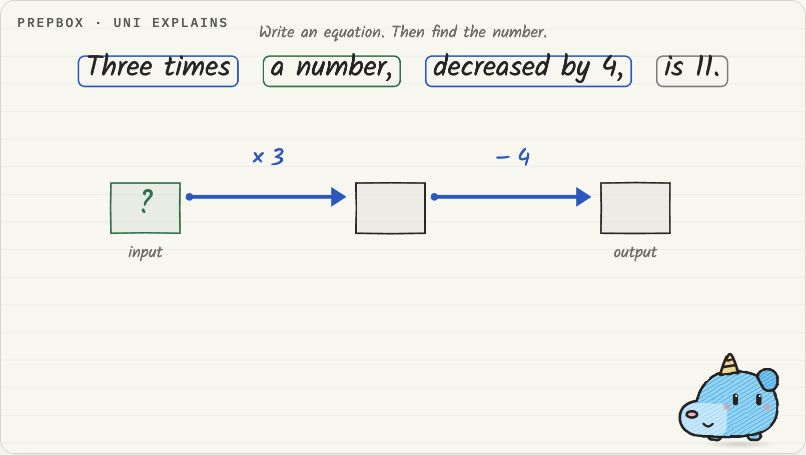
Your child has had a go. Now the matching video is there to review the reasoning from start to finish.
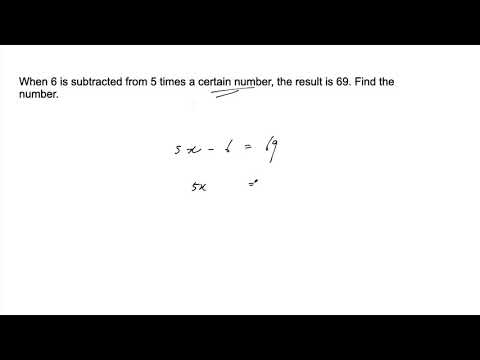
Curriculum → question → skill → help with their attempt → full review.
Why it’s free
So the first two sessions are on us. Sit nearby, see how your child gets on, and decide what’s next afterward. If they’d like more help, we’ll go through the options after the first session.
Min’s teaching track record
These are existing examples from Min’s students. They reflect his teaching history, not measured outcomes from the new free studio.
 Mike
Mike
99% in Calculus
B.S. Physics and Math
 Olivia
7/7 in IB Higher Level Math
A.B. in Government
 Kasra
Kasra92% in Calculus
B.S. Comp Sci & Statistics
Before you book
Yes. Booking needs a parent or guardian email, not a card. Your child’s first two sessions are free, and there is no subscription or automatic charge. Practice, lessons and automatic marking stay free afterward.
A tablet and pen. Use an iPad or Android tablet with a stylus in the PrepBox app, or a computer with a drawing tablet such as a Wacom in a web browser. A mouse or trackpad isn’t enough: your child writes every step by hand, the way they would on paper. No tablet or pen? Ask Min about equipment options.
At the booked time, your child joins a shared table from home and works on their own math for an hour: a grade-level skills check or a workbook section. They write each step by hand. Submitted work is marked automatically, Uni helps on their page and a tutor is in the room. Classmates’ attendance varies.
Choose “Book a free session” and enter a parent or guardian email. Type the six-digit code we send, add your child’s name and grade, then pick a time. Book both free sessions within two weeks of signing up. Can’t make it? Cancel before the start time and book another.
Your child keeps the same account, with practice, lessons and automatic marking that don’t expire. If they’d like ongoing help from Uni or a tutor, we’ll go through the options after the first session. Nothing is charged unless you choose a plan.
Registration accepts Grades 1–12. If you are unsure which session fits, ask Min before booking.
The studio represents students with characters. This demonstration uses fictional students. For questions about your child’s information and account, read our privacy policy or contact us.
Yes. Book a call with Min and ask anything before your child’s first session.
Your child’s first two sessions are free. No card or subscription — bring a tablet and pen, and take a seat at the table.